Compatibility
The anonymize process is available on Xporter 6.3.2+ versions.
The User Anonymize Process
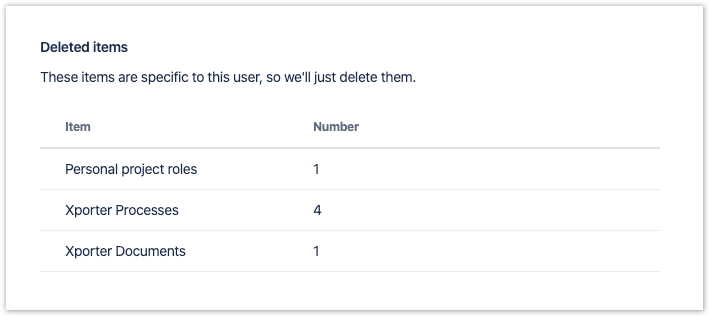
During the anonymized process, there are some items that can be found regarding Xporter. Xporter will anonymize, delete and transfer User's data regarding Xporter configuration and data usage.See below the items that can be found and their meaning.
Items
| Name | Description |
|---|---|
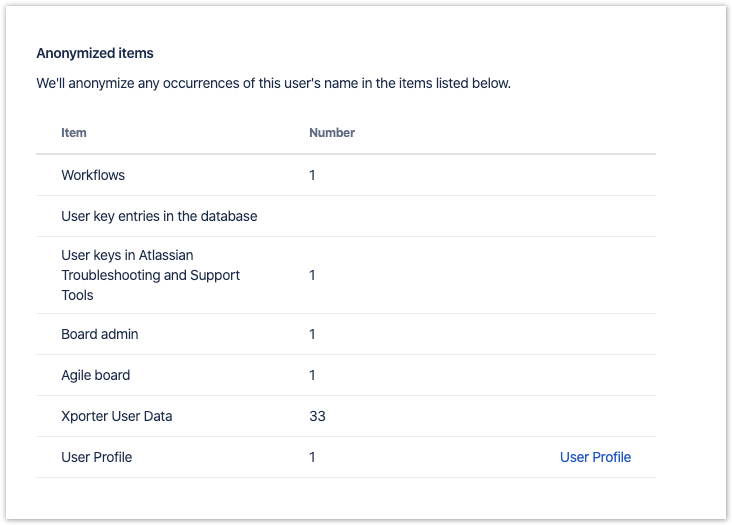
| Xporter User Data | Data related to Xporter configuration and usage such as Audit log, created and last updated data regarding the following configuration:
|
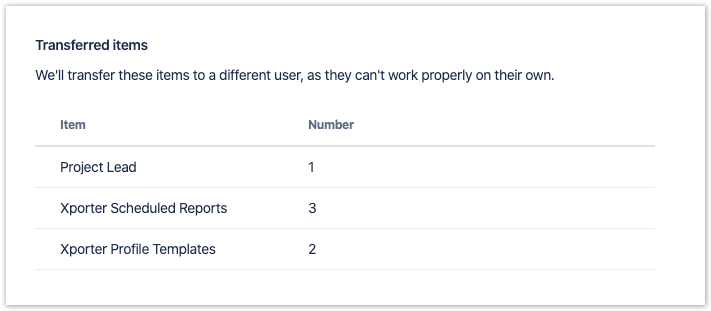
| Xporter Profile Templates | Profile templates created by the user being anonymized. |
| Xporter Processes | Data related to Xporter export processes created by the user being anonymized. |
| Xporter Documents | Data regarding documents generated by the user. |
| Xporter Scheduled Reports | Run as of Xporter Scheduled Reports. |
Transferring Ownership
Transferred items
There are two configurations that require ownership transfer: User profile templates and the run as of the Scheduled reports.
Regarding User profile templates, the ownership will be replaced with the user selected to transfer.
The same will happen for all the Scheduled Reports where the user being anonymized is defined as the run as user. Xporter has two levels of Scheduled reports: on Jira Administration and Project level.
If the new user is not a Jira Administrator or even Project Administrator(depending on the level of configuration), the run as user will be defined has empty. In this case, the Scheduled Report won't run and it will require an action from the Project or Jira administrator to fix this.
Anonymized items
Xporter will replace the current user key with the new user key anonymized in all the Xporter database tables.
Deleted items
During the anonymization process, all data regarding Xporter Processes and generated documents will be deleted.